Chapter 4 of 11 · 15 min
Staff, roles and PINs
Who works here, what each of them may do, and the two completely different ways they sign in.
Everybody who works in the shop has an account, the right role, the right branches, and a way of signing in that matches the job they actually do.
There are two logins in this system and they are not the same thing. Getting them the wrong way round is the single most common thing a new store gets wrong, and it looks like a broken password rather than a misunderstanding.
Two logins
A POS PIN opens the till. Four to six digits, typed on the register's keypad. It signs a cashier into a shift. It does not open this website.
An Email and a password open the back office — this website. They do not work at the till.
So a cashier who only ever stands at the counter needs a PIN and nothing else; leave their email empty. Somebody who does both, like you, gets both.
Add somebody
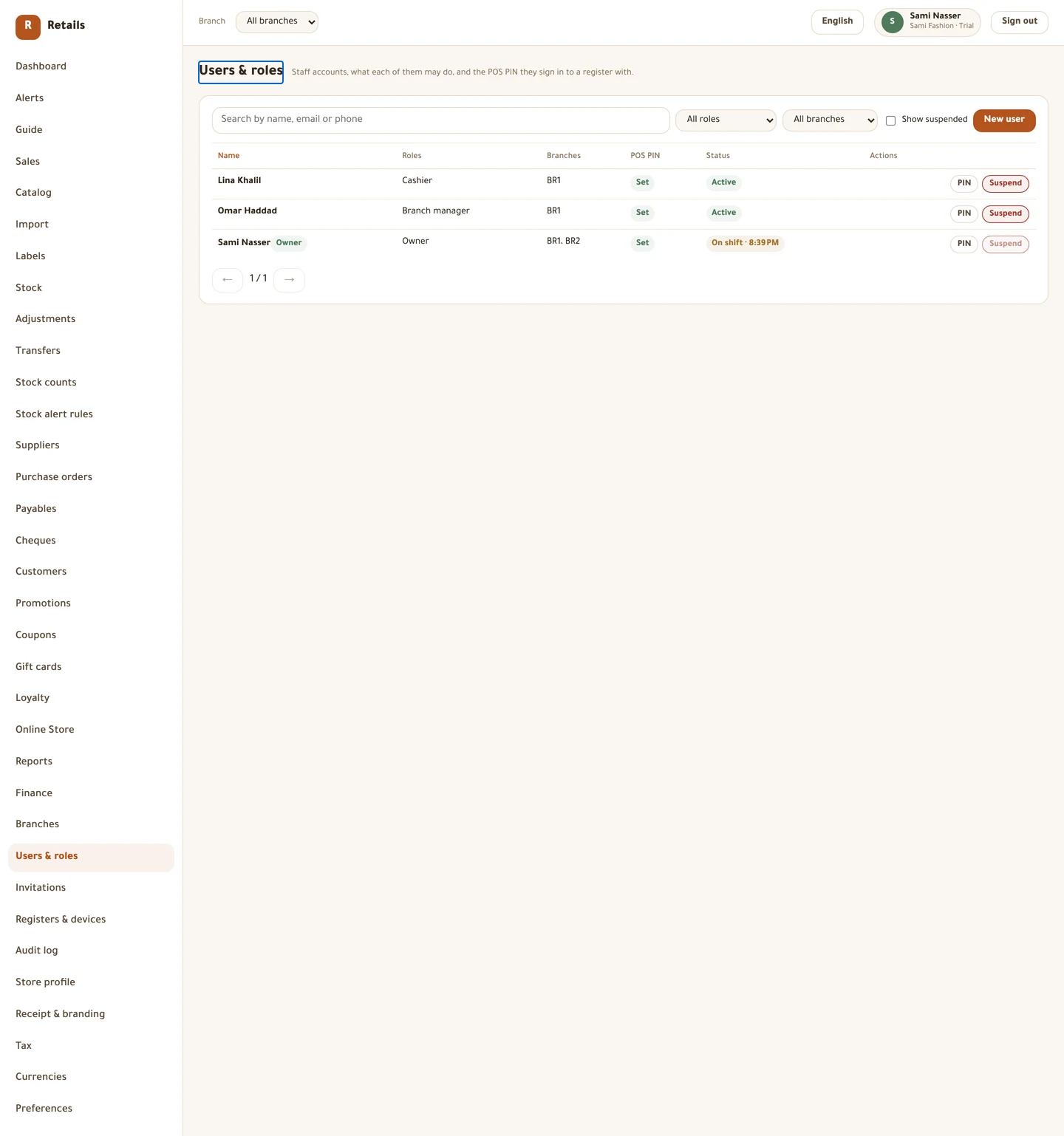
Open Users & roles from the side menu. The list shows name, roles, branches, whether a PIN is set, and status.
Do this
- Press New user.
- Fill in Full name, and Phone if you want it.
- Fill in Email only if this person needs the back office. The help text under it says the same: a PIN-only cashier does not need one.
- Tick their Roles. One person can hold more than one.
- Tick Branches this user works in. A register only offers users of its own branch at sign-in.
- If they will stand at a till, type a POS PIN — 4 to 6 digits, unique among the users of the same branch.
- Press Save.
The six roles
Six role templates ship with the store, and they are yours to edit. Nothing overwrites a permission you have changed — only missing ones get added.
Do this
- Owner — everything, including settings, cost prices and money. Keep it to yourself.
- Branch manager — runs one branch. Manual discount up to 20%, approves counts and discrepancies, can void and take returns without asking anyone.
- Cashier — sells. Manual discount up to 5%. Voiding a line, taking a return, overriding a price and opening the drawer all ask for a supervisor PIN.
- Inventory — counts, adjusts, raises and receives purchase orders. Deliberately cannot receive more than was ordered.
- Accountant — reads the money, manages suppliers, records payments, reads the audit log. Deliberately cannot raise or receive a purchase order.
- Marketing — offers, storefront content, customer lists and exports. Cannot hand out store credit.
Invite somebody instead
If the person should set their own password, invite them rather than typing one for them.
Do this
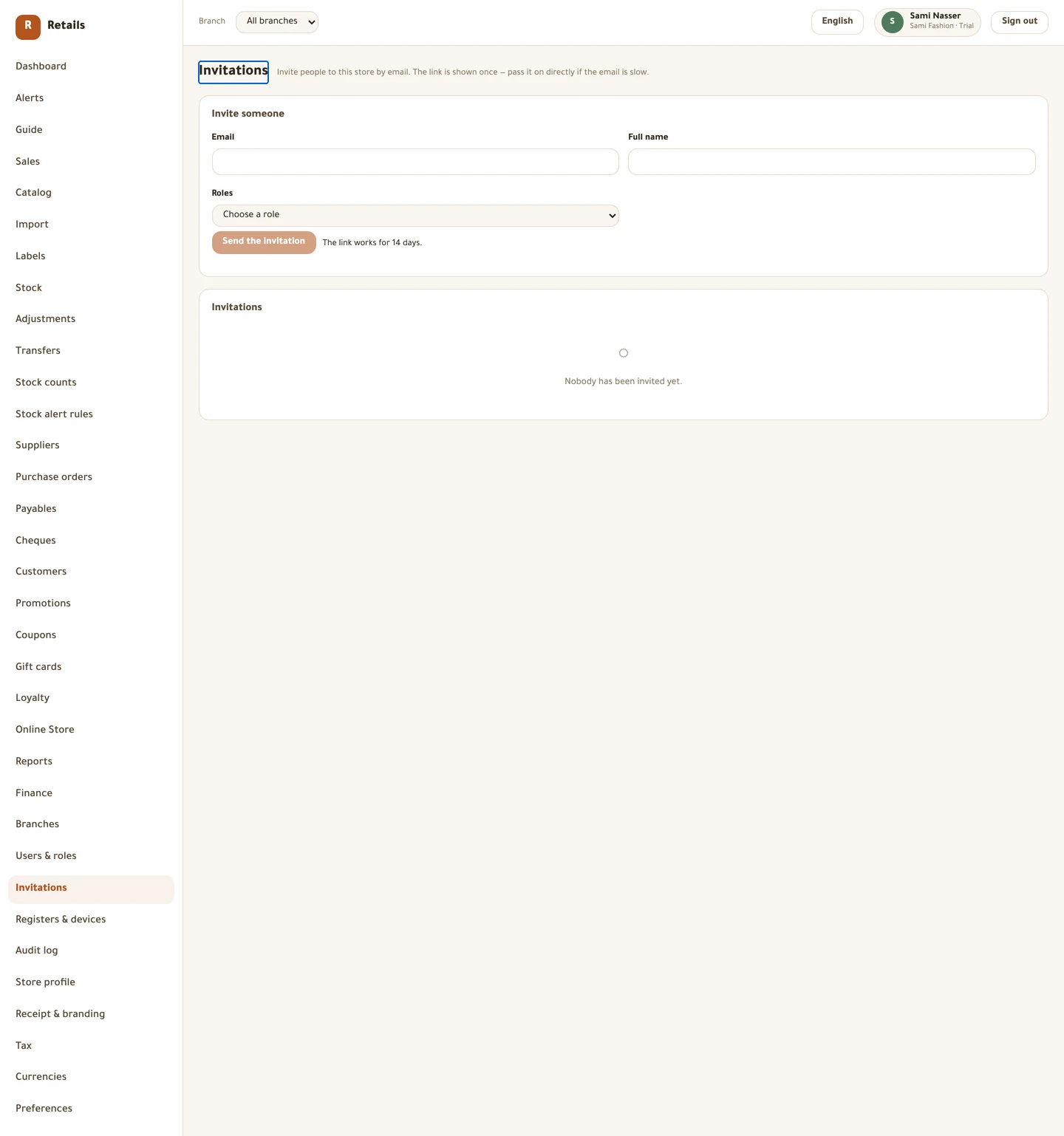
- Open Invitations and fill in Email, Full name and a role under Roles.
- Press Send the invitation.
- Copy the link immediately. It is shown once and cannot be looked up again — only its fingerprint is kept.
- The link works for 14 days. Send again issues a new one and kills the previous link the moment it is issued.
- Cancel withdraws an invitation that has not been accepted.
When somebody leaves
Suspend them. Do not try to delete them — their name has to stay on last year's receipts, and there is no delete for exactly that reason.
Do this
- Find their row and press Suspend.
- They disappear from every register's sign-in list at its next sync, and can be brought back with Reactivate at any time.
- Use Remove PIN if you want to stop them signing in at a till but keep the account active.
Changing what somebody may do
Edit their roles from the same editor. Permissions are re-checked on the server at their next action, so taking a role away takes effect immediately — a till that already loaded the old set does not get to keep it.
Every money or stock action anybody takes is recorded: who, when, and where. That is what Audit log is for, and it is why you can answer "who gave that discount?" six months later.
Before you move on
- Everyone who stands at a till has a PIN and at least one branch
- Only the people who need the back office have an email address
- Nobody is holding the owner role who does not need it
- You have a second owner, so the last-owner rule can never lock you out
- You know to suspend rather than delete when somebody leaves
Every picture on this page is a photograph of the real screen, taken from a running store.